A real-world accessibility analysis showing where digital systems exclude users, which failures repeat, and which fixes prevent the most harm.
Many websites unintentionally block people with disabilities. These barriers can be invisible to builders, but very real for users who rely on screen readers, keyboard navigation, or who have low vision.
Using the AccessGuru dataset aligned with WCAG 2.1, we examined where accessibility failures occur, which violations dominate, and which pages create the greatest user harm.
We standardized domain labels, filtered unsuccessful scrapes, aggregated by page and domain, and used severity-weighted scoring to prioritize remediation where it matters most.
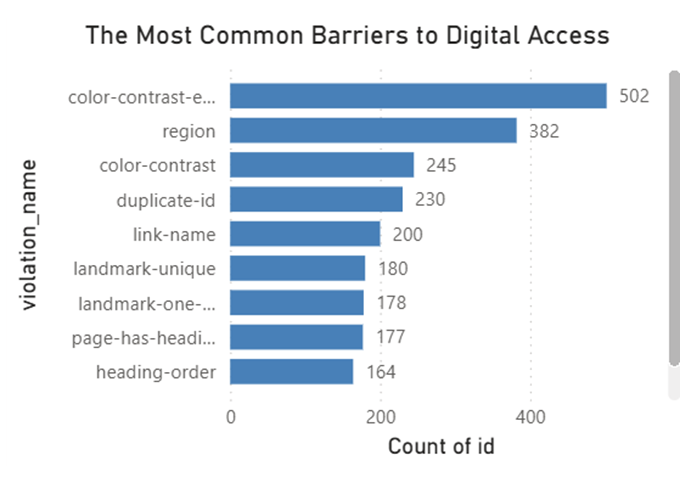
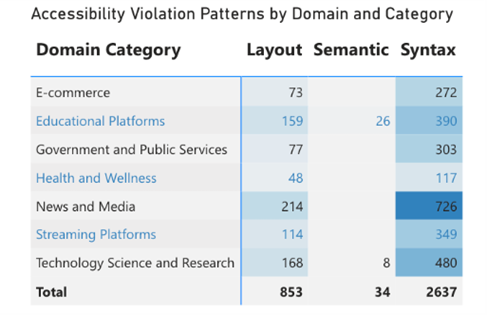
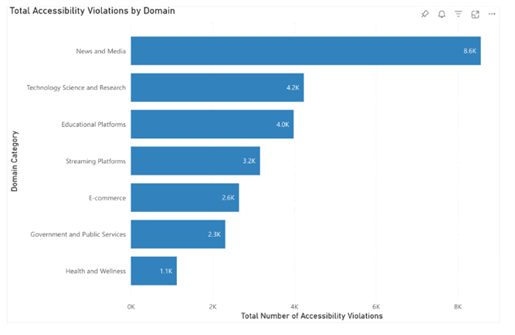
Accessibility failures are not random. They cluster by domain, repeat across sites, and concentrate harm on a smaller set of pages.
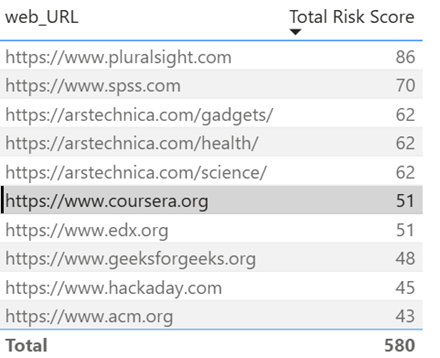
Not all violations are equal. Some pages have fewer issues but more critical ones. We created a Risk Score to prioritize user harm.
5× Critical · 4× Serious · 3× Moderate · 2× Minor
Unlike raw counts, Risk Score helps focus remediation on the pages that block users most.
We clustered pages by violation patterns (KMeans, k=5; silhouette 0.334). Four clusters form meaningful “problem families”; one is low-violation outliers.
Contrast-heavy pages — dominated by color contrast violations (harmful for low-vision users).
Navigation confusion — missing landmarks/regions, making screen reader navigation unreliable.
Structure-broken — duplicate IDs and broken HTML cause assistive tech to misinterpret page structure.
Heading disorder — incorrect heading hierarchy prevents users from skimming content.
These failures aren’t just technical—they block real people from using digital services.
| Violation | Who it harms | Why it matters |
|---|---|---|
| Color contrast | Low-vision users | Text becomes unreadable |
| Missing link names | Screen reader users | Links lack meaning and context |
| Missing landmarks | Blind users | Navigation breaks; users get lost |
| Duplicate IDs | Assistive tech users | Page structure becomes ambiguous or unusable |
Based on violation types in the dataset, consistent implementation of these practices can prevent a large share of observed issues (best-case).
Enforce WCAG contrast thresholds with automated checks in design tools and CI pipelines to prevent regressions before deployment.
Standardize <nav>, <main>, <header>, <footer> across templates to make screen reader navigation reliable.
Replace vague links (“click here”) with descriptive labels, and ensure image-links include appropriate alt text for context.
Enforce unique IDs and a logical heading hierarchy using linting/testing to improve assistive-technology interpretation.
Addressing these four design practices could prevent nearly 80% of observed violations (2,802 of 3,524), assuming consistent implementation across templates and components.
Everything is designed to be transparent and reusable.
Paste your Power BI share link here (optional) so judges can interact with slicers and KPIs.
This analysis reflects observed violations from successfully scraped pages. Counts may be influenced by crawl depth and site structure. Findings indicate patterns and relative risk—not a full accessibility audit of any individual organization.
Download the complete analysis, explore our code, and start implementing these high-impact fixes today.
Includes full methodology, findings, and recommendations.